Browser-based trace replay for Playwright test debugging
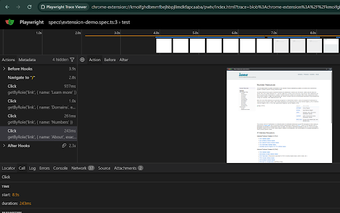
Playwright Trace Viewer, from the Playwright team, helps developers debug Playwright end-to-end tests with a browser extension that opens recorded traces. The tool renders an interactive replay of test execution so engineers can explore DOM state, network activity, and console output step by step. Key highlights include in-browser time-travel replay, local-only processing, and direct links from actions back to test code. It's aimed at Playwright users, QA engineers, and CI teams who need faster failure triage.
Opens Playwright trace files in the browser so reviewers skip local CLI steps
The viewer lets you open Playwright trace .zip files directly from web pages such as Jira, Confluence, or email, removing the need to download and run a local Node.js command for inspection. That reduces the time between an artifact being posted and a forensic review, allowing engineers to begin examining a failing run immediately in the browser without installing Playwright locally.
Processes traces locally to limit external data exposure
The viewer loads and processes trace data entirely within the browser context and does not transmit trace contents to external servers. That local-only handling keeps screenshots, network request archives, and console logs inside the user's environment when inspecting CI artifacts. Teams that attach proprietary data to traces get a privacy advantage because no external upload step is part of the inspection flow.
Provides a step-by-step, high-fidelity time-travel record for debugging
The viewer reconstructs test execution into a navigable timeline and exposes concrete inspection points. It provides:
- Timeline view: scrub through execution frames.
- Action inspection and DOM snapshots: see page state before and after interactions.
- Network and console logs: examine requests and runtime errors.
- Source mapping: jump from an action to the test code line.
Integrates with Playwright workflows and mirrors the CLI GUI without Node.js
The viewer installs as a Chrome extension and runs on Chromium-based browsers, and the developer maintains it as part of the Playwright project. Compared with running a local 'npx playwright show-trace' command, the extension removes the download-and-run step for traces delivered through web tools, so reviewers can inspect artifacts published from CI or issue trackers without invoking local tooling first.
A focused, browser-first triage tool that complements local debugging
The viewer is a pragmatic option for Playwright teams who need rapid, browser-based triage of recorded test runs; it lowers the barrier to inspect artifacts shared through issue trackers and CI pipelines. Expect it to serve as a first-pass diagnostic: use the viewer to pinpoint failures, then run targeted local debugging when environment-specific fixes or replays are necessary for developers.